Bot ManagementExample data
Bot Org Chart
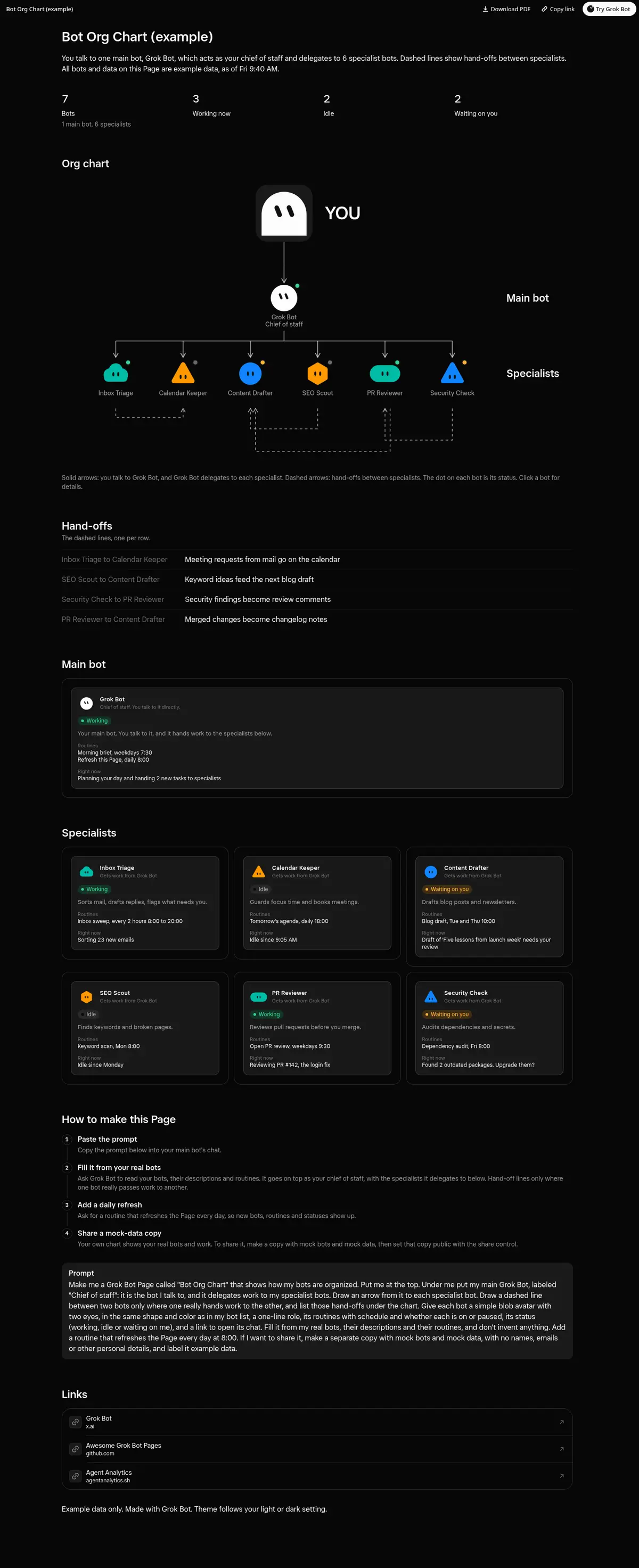
An org chart of your bots: you at the top, Grok Bot as the chief of staff you talk to, the specialist bots it delegates to, their routines and status, and dashed hand-offs between them.
Prompt
Prompt
Make me a Grok Bot Page called "Bot Org Chart" that shows how my bots are organized. Put me at the top. Under me put my main Grok Bot, labeled "Chief of staff": it is the bot I talk to, and it delegates work to my specialist bots. Draw an arrow from it to each specialist bot. Draw a dashed line between two bots only where one really hands work to the other, and list those hand-offs under the chart. Give each bot a simple blob avatar with two eyes, in the same shape and color as in my bot list, a one-line role, its routines with schedule and whether each is on or paused, its status (working, idle or waiting on me), and an Open chat link: a plain <a> with target="_top" and href grokbot://app/v1/agent?id=<that bot's id>. Fill it from my real bots, their descriptions and their routines, and don't invent anything. Add a routine that refreshes the Page every day at 8:00. If I want to share it, make a separate copy with mock bots and mock data, with no names, emails or other personal details, and label it example data.
How to use it
- Copy the prompt and paste it into a chat with Grok Bot.
- Swap in your own bots, accounts or data sources where the prompt asks for them.
- If the prompt does not create a refresh routine, ask Grok Bot for one.
- To share your version, make a copy with mock data and make that copy public. Then get it listed.